Pi Agent tracing with Langfuse
What is Pi? Pi is a minimal, extensible AI coding agent that runs in your terminal. It supports 15+ providers and hundreds of models, and adapts to your workflows through extensions, skills, prompt templates, and themes.
What is Langfuse? Langfuse is an open-source AI engineering platform. It helps teams trace agentic applications, debug issues, evaluate quality, and monitor costs in production.
Community-maintained integration
The pi-langfuse extension is built and maintained by the community, not by the Langfuse team. If you run into issues, please report them on the extension's repository.
What can this integration trace?
The pi-langfuse extension hooks into Pi's lifecycle events and sends each prompt to Langfuse as its own trace, grouped by Pi session. You can monitor:
- User prompts: every prompt you send to Pi, grouped into one trace per prompt.
- Agent workflow: a root agent observation that spans the whole turn.
- Model generations: each model request, with inputs, outputs, token usage, and cost.
- Tool calls: the tools Pi invokes, captured as tool observations with their inputs, outputs, and error status.
- Final response: the assistant's final answer for the prompt.
- Scores: trace-level scores such as tool-call count, tool-success rate, turn count, and whether the session had errors.
How it works
- You install the
pi-langfuseextension with Pi's package manager, which registers it in your Pi settings. - On each user prompt, the extension opens a Langfuse trace and records a root
agentobservation, agenerationper model request, and atoolobservation per tool call. - When the turn ends, the final response, token usage, cost, and trace-level scores are attached and the trace is sent to your project using the Langfuse SDK.
- Credentials and capture options are resolved from a config file, environment variables, or an interactive setup command.
Quick start
Set up Langfuse
- Sign up for Langfuse Cloud or self-host Langfuse.
- Create a new project and copy your API keys from the project settings.
Install Pi and the extension
Install Pi (requires Node.js 22+) and log in to a model provider so it can run sessions:
npm install -g --ignore-scripts @earendil-works/pi-coding-agent
pi   # then run /login inside the interactive session
Install the pi-langfuse extension. This downloads the package and registers it in your Pi settings automatically:
pi install npm:pi-langfuseConfirm it is registered with pi list.
Add your Langfuse credentials
The recommended setup is the interactive command. Run it inside Pi and enter your public key, secret key, and host when prompted — the values are saved to ~/.pi/agent/pi-langfuse/config.json:
/langfuse-setup    # (re)enter credentials
/langfuse-status   # show host, masked key, and capture policy
/langfuse-test     # verify host and keys
Alternatively, create the config file yourself at ~/.pi/agent/pi-langfuse/config.json:
{
  "publicKey": "pk-lf-...",
  "secretKey": "sk-lf-...",
  "host": "https://cloud.langfuse.com",
  "privacyPreset": "full-debug"
}
Or set your credentials with environment variables. Saved config takes precedence — environment variables are only used when the config file is missing or incomplete:
export LANGFUSE_PUBLIC_KEY="pk-lf-..."
export LANGFUSE_SECRET_KEY="sk-lf-..."
export LANGFUSE_BASE_URL="https://cloud.langfuse.com" # 🇪🇺 EU region
# Other Langfuse data regions include 🇺🇸 US: https://us.cloud.langfuse.com, 🇯🇵 Japan: https://jp.cloud.langfuse.com and ⚕️ HIPAA: https://hipaa.cloud.langfuse.com
Use Pi
Run Pi as usual. Sessions are sent to Langfuse as you work, and Pi prints 📊 Langfuse: Tracing enabled at startup:
cd your-project
pi "Read README.md and summarize what this repository does"
View traces in Langfuse
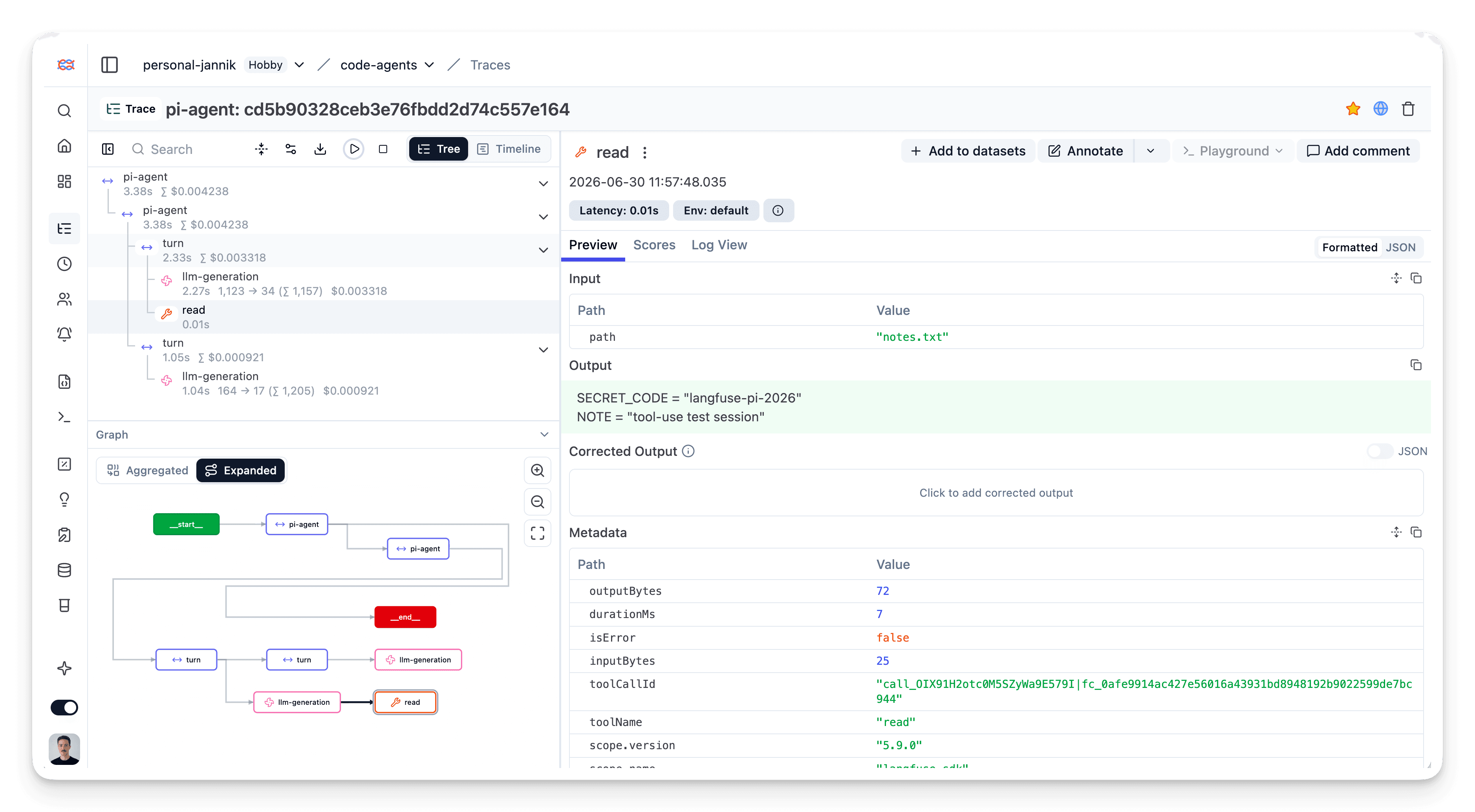
Open your Langfuse project to see the captured traces. The structure mirrors how Pi actually works:
- Prompt trace: one trace per user prompt, from your prompt to the final answer.
- Agent and generations: a root agent observation, with one generation per model response, including token usage and cost.
- Tool calls: captured as tool observations with input, output, and error status, so you can spot where a turn went wrong.
- Scores: trace-level scores (tool-call count, tool-success rate, turn count, error flags) for quick filtering and quality monitoring.
Privacy controls
pi-langfuse redacts common secrets (API keys, bearer tokens, passwords, private keys) and hashes local absolute paths before upload. You control what payloads are sent with a privacy preset, set via privacyPreset in the config file or the LANGFUSE_PRIVACY_PRESET environment variable:
| Preset | Captures |
|---|---|
metadata-only | Metadata only; omits inputs, outputs, tool I/O, system prompt, and cwd |
prompts-only | Prompt/provider inputs plus metadata |
conversations | Inputs and assistant outputs, but omits tool I/O, system prompt, and cwd |
full-debug | Full trace detail (the default) |
Fine-grained flags override the preset: LANGFUSE_CAPTURE_INPUTS, LANGFUSE_CAPTURE_OUTPUTS, LANGFUSE_CAPTURE_TOOL_IO, LANGFUSE_CAPTURE_SYSTEM_PROMPT, and LANGFUSE_CAPTURE_CWD. Keep ~/.pi/agent/pi-langfuse/config.json private and never commit your API keys.
Troubleshooting
No traces appearing in Langfuse
- Extension not loaded. Run
pi listand confirmpi-langfuseappears, then run/langfuse-statusinside Pi to check the active configuration. - Credentials missing or invalid. Run
/langfuse-testto verify the host and keys. Make sure the public key starts withpk-lf-. - Region mismatch.
host(orLANGFUSE_BASE_URL) must match the region your keys belong to.
Authentication errors
Verify your API keys are correct and that the host matches the region your keys belong to:
- EU region:
https://cloud.langfuse.com - US region:
https://us.cloud.langfuse.com - Japan region:
https://jp.cloud.langfuse.com - HIPAA region:
https://hipaa.cloud.langfuse.com
Data privacy
When enabled, the extension sends Pi session data to Langfuse, which may include prompts, assistant messages, and tool inputs and outputs depending on your privacy preset. Use a more restrictive preset (such as metadata-only or conversations) for sessions containing data you don't want stored in Langfuse.
Resources
- pi-langfuse extension (npm)
- pi-langfuse repository (GitHub)
- Pi documentation
- Langfuse TypeScript SDK
Last edited
